 Penna
PennaHome / Personalised colouring book
How to make a personalised colouring book from your photos
To make a personalised colouring book, turn your photos into colouring pages with Penna, pick the pages in the order you want, and export them as one PDF that you print at home on A4 and staple or bind.
A colouring book starring your child, your family or your pets makes a birthday present, a party bag filler or a rainy-day project.
Step by step
Make your pages
In Penna, turn photos into colouring pages, or draw the person in a photo into one of 24 adventure scenes. Each page is saved in your Library.
Start a book
Tap Make a book and pick the pages you want in it.
Put them in order
Arrange the pages on the grid and look through the book in the preview.
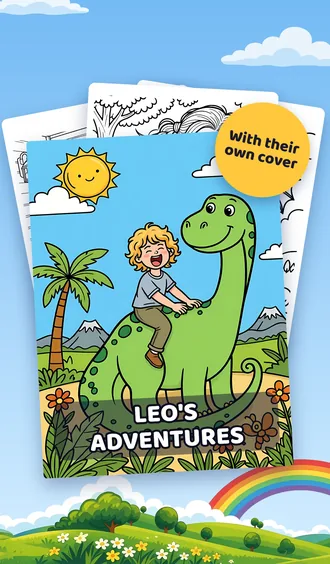
Add a cover (Penna Pro)
Give the book a title and a cover: in colour from an adventure page, or in black and white from any other page.
Export one PDF
Penna puts the whole book into one PDF, sized for A4 (or US Letter).
Print and bind
Print the PDF at home, then staple the pages, punch them into a ring binder or tie them with ribbon. A local print shop can print and bind it too.
Make your first page
Free to try: 2 pages to start. No account needed.
Ideas for a personalised colouring book
Starring your child
Your child as an astronaut, a superhero, a dragon rider: one adventure per page.
Party bags
A small book of the birthday child for every guest, or a page of each guest to take home.
The family book
Mum, Dad, brothers and sisters, grandparents and cousins, one page each, to colour in on a visit.
Our summer holiday
Photos from the beach or a trip away turned into a book of memories to colour in.
Pets
The dog, the cat and the hamster, each with their own page.
For the classroom
Teachers can make pages of school trips and class events from their own photos.
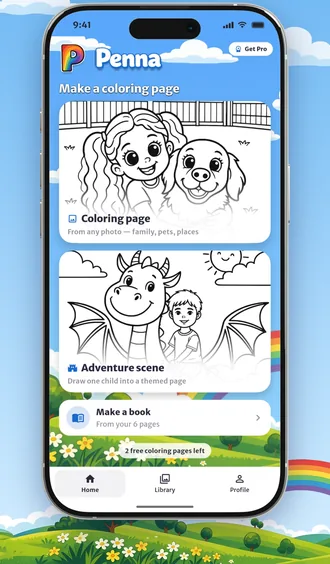
Everything stays in Penna's Library on your phone: reopen a book later, add pages, rename it or share the PDF again.
Making a book and the PDF is free. A cover with a title is part of Penna Pro.
Printing and binding at home
- Paper: everyday 80 gsm printer paper for crayons and colouring pencils, heavier paper (100 to 120 gsm) for felt-tip pens.
- Sides: print single-sided for felt-tips so the ink does not show through.
- Binding: two staples on the left edge, a ring binder, or a hole punch and ribbon.
- Cover: print the cover on card to make the book last longer.
Questions
How do I make my own colouring book for free?
Install Penna, turn your photos into colouring pages, tap Make a book, put the pages in order and export the book as one PDF to print at home. Making the book and the PDF is free, and Penna is free to try with 2 pages to start. For a whole book of pages and a cover with a title, there is Penna Pro.
Can I make a colouring book from my own photos?
Yes. Every page in a Penna book is made from your own photos, either as the photo itself or with the person drawn into an adventure scene.
Where can I print a colouring book in the UK?
Penna gives you the book as one A4 PDF. Print it on your home printer, or take the PDF to a local print shop to have it printed and bound.
Can I add a cover with a title?
Yes, with Penna Pro. The cover can be in colour, made from an adventure page, or in black and white from any other page.
Can I add more pages later?
Yes. Books are saved in Penna's Library on your phone, so you can reopen a book, add pages and export it again.
More ideas
Turn a photo into a colouring page you can print
Penna is an iPhone, iPad and Android app that turns your photos into printable colouring pages and personalised colouring books you print at home on A4. Free to try.
Printable colouring sheets made from your own photos
Make printable colouring sheets from your own photos with Penna on iPhone, iPad or Android: family, pets and days out as black-and-white pages for A4 paper.
Penna questions and answers
Answers about Penna: what happens to your photos, how to print pages and books, which paper to use, what is free and what Penna Pro adds, and which phones it runs on.
Make your first page
Penna is free to try on iPhone, iPad and Android.
Scan this code with your phone's camera to get Penna.
Free to try: 2 pages to start. No account needed.