 Penna
PennaHome / Printable coloring sheets
Printable coloring sheets made from your own photos
Penna is an iPhone, iPad and Android app that turns your own photos into printable coloring sheets: black-and-white pages for A4 or US Letter paper that you print at home, one sheet at a time or as a whole book.
Instead of the same cartoon characters every child has colored before, print sheets of the people, pets and places your child knows.
How to make a printable coloring sheet
Pick a photo
Open Penna and take a photo or choose one from your library: your child, the dog, grandma's garden, a day at the beach.
Choose a style and level
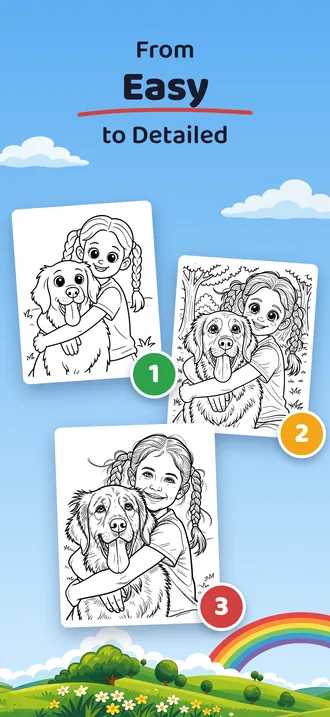
Cartoon for big, simple shapes, classic coloring book in three levels of detail, or anime.
Print the sheet
Tap Print and choose A4 or US Letter. Penna makes every sheet at print quality (300 dpi).
Print a stack
Made several sheets? Put them into one PDF book and print them all at once.
Make your first page
Free to try: 2 pages to start. No account needed.
Ideas for coloring sheets of your own
The family pet
The dog on the sofa or the cat in the window, ready to color in its real colors or wild new ones.
Grandparents
A sheet of grandma and grandpa to color before a visit, or to mail to them afterward.
A day out
The zoo, the pumpkin patch, the first snow: print a sheet of the photo and color the memory.
Birthday table
A sheet of the birthday child for every guest to color at the party.
Your child in an adventure
Penna can draw your child into one of 24 scenes, from riding a dinosaur to flying a rocket.
Waiting time
Print a few sheets for the restaurant, the train or the doctor's waiting room.
For homeschool and the classroom
Coloring sheets of your own photos fit a lesson. Print the plants from a nature walk, the animals from a farm visit or the buildings from a field trip, and let the children color and label them. Family history works too: print a sheet of a grandparent's old photo and talk about it while the children color.
Teachers: use photos you have permission to use, and check your school's rules before taking photos of children. Penna deletes each photo right after processing.
From simple to detailed
Simple sheets have bold lines and big shapes for small hands and chunky crayons. Detailed sheets have fine lines for older children, and for grown-ups who like to color too.
Printing tips
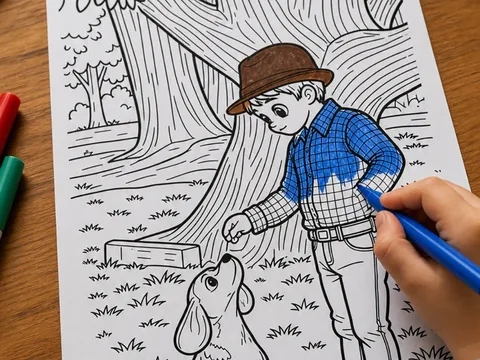
Any printer works. The sheets are black and white, so a black-and-white printer is enough.
- Paper: everyday printer paper for crayons and colored pencils, heavier paper (28 to 32 lb, 105 to 120 gsm) for markers.
- Print it again: your sheets stay in Penna's Library on your phone, so you can print a second copy for a sibling or a friend.
- Save ink: the simple level uses fewer lines than the detailed one.
More about paper and printing is in the FAQ. To turn a stack of sheets into a book, see how to make a custom coloring book.
Questions
How do I make a printable coloring sheet from a photo?
Open Penna on your iPhone, iPad or Android phone, take or pick a photo, choose a style, and tap Print. The sheet is sized for A4 or US Letter paper.
Are the coloring sheets free?
Penna is free to try: 2 pages to start. Penna Pro gives you many more pages, enough to print sheets every week or whole coloring books.
Can I print the same sheet more than once?
Yes. Every sheet is saved in Penna's Library on your phone, so you can print it again or share it as a PDF.
Do I need a color printer?
No. Coloring sheets are black and white, so any printer works.
Can I use Penna for homeschool or in class?
Yes. Make sheets from your own photos of field trips, nature walks or family history, print them on A4 or US Letter, and let the children color and label them.
More ideas
How to turn a photo into a printable coloring page
Turn any photo into a printable coloring page with Penna on iPhone or Android: take or pick a photo, choose a style, print on A4 or US Letter. Free to try.
How to make a custom coloring book from your photos
Make a personalized coloring book from your own photos with Penna: turn photos into pages, put them in order, export one PDF and print it at home.
Rainy day activities for kids at home, no screens needed
18 screen-free rainy day activities for kids at home: blanket forts, indoor scavenger hunts, baking, puppet shows, puddle walks and coloring pages of themselves.
Penna questions and answers
Answers about Penna: what happens to your photos, how to print pages and books, which paper to use, what is free and what Penna Pro adds, and which phones it runs on.
Make your first page
Penna is free to try on iPhone, iPad and Android.
Scan this code with your phone's camera to get Penna.
Free to try: 2 pages to start. No account needed.